


Understanding Motive: Tracker within the Motive 3 Ecosystem
OptiTrack Motive: Tracker is a specialized software edition that operates within the comprehensive Motive 3 motion capture software platform. Access to the powerful features of Motive: Tracker is enabled through a specific license key. This allows users to leverage the core strengths of Motive 3 while unlocking the dedicated toolset designed for high-precision object tracking in engineering and research applications.
Unrivalled Precision
Experience industry-leading 3D reconstruction and powerful rigid body solving for sub-millimeter accuracy. Get the data quality your critical projects demand.Engineered for Complexity
Effortlessly track up to 2,000 markers, manage high object counts, and analyze high-speed motion with our robust 64-bit, multi-threaded architecture.Rapid, Simplified Setup
Slash your system setup time by up to 75%. Get to your critical work faster with intuitive calibration and streamlined operation, even for large-scale systems.Seamless Workflow Integration
Leverage our open architecture. Stream data via VRPN or Trackd, utilize the NatNet SDK, and access data at any pipeline stage (2D images, 3D points, rigid bodies) for ultimate flexibility.Powerful Rigid Body Solving
The most precise 6DoF data imaginable is at your fingertips with OptiTrack Motive: Tracker’s industry-leading 3D reconstruction and rigid body solving. Use high-level tracking filters and constraints to fine tune the performance of your object tracking—perfect for demanding applications like high object count and high speed UAV tracking.
Flexible real-time streaming options
OptiTrack Motive: Tracker ensures flexible real-time streaming by supporting standard engines like VRPN and Trackd. For bespoke solutions, custom network interfaces can be developed using our free NatNet SDK, allowing tailored data delivery for your specific tracking applications and system integrations.

Open SDKs & API access
Motive: Tracker offers an open optical tracking environment with its adaptable architecture and complimentary developer tools. Gain access to data throughout the processing pipeline—from raw 2D images to fully labeled rigid bodies—and even replace the UI using our Motive API.
Recording and data management
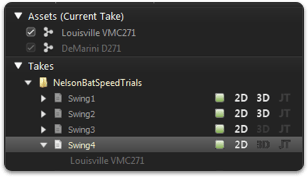
Streamline data handling with Motive: Tracker’s updated asset and data management. This system automatically links tracked rigid bodies and custom markersets as metadata within their recordings. All project files are organized into a single folder, simplifying management for complex trials.
Have Questions? Our Experts Are Ready to Help!
Reach out today to discuss your project, get a quote, or schedule a personalised demonstration of Motive: Tracker.
7A Kent Street,
Yarraville, VIC 3013, Australia.
Monday to Friday
9:00 am to 5:00 pm (AEST)
Get Intouch
We can help you with 3D printing, 3D scanning, motion tracking and VR. Our professional teams are highly
Features & Specifications
Tracking, solving, and labelling
- Track up to 2,000 markers with the industry’s most precise 3D reconstruction
- Manual trajectory labelling for non-rigid groups of markers
- One-click rigid body creation
- Customizable rigid body solver parameters, including:
- Deflection and flexibility
- Dynamic and static constraints
- Marker sharing
- Kalman smoothing
- System health monitoring and event logging ensure that every stage in the workflow operates optimally and potential problems easily are identified if issues arise
- Multi-camera Rigid Body tracking
- 3 marker minimum per Rigid Body for 6DoF
- 7 marker maximum per Rigid Body
- Max Rigid Bodies: 32
- Redundant Rigid Body marker hand-off
Camera control and frame sync
- Camera manager with drag-and-drop migration between camera groups
- Synchronization control, including frame delivery and shutter offset
- Setting presets for quickly tuning cameras to specific uses
- Tracking
- Scene video reference
- Aiming
- Custom
- Complete control of camera settings
- Frame rate
- Exposure
- Threshold
- Illumination (strobed or continuous)
- Gain
- Filter Switcher
- Full-frame, synchronized, calibrated reference video with 3D overlay for compatible cameras
- Aim Assist integration for compatible cameras
- Auto-masking of all 2D camera views with a single click
- Pixel inspection tool for measuring pixel brightness anywhere on any camera
- Back-projection of 3D marker data onto source 2D camera images
- Detailed camera activity and health indicators overlaid on 2D camera views
External integration
- SMPTE Time Code support for recorded and streamed data (via eSync)
- Flexible real-time streaming:
- Free MotionBuilder plugin (7.5, 2009-2013)
- IKinema Action for Maya (2009-2013)
- VRPN
- Trackd
- OptiTrack’s custom NatNet SDK
- Bypass the Motive UI and integrate tracking directly into your applications using the Motive API
- External sync in/out:
- Genlock (via eSync)
- General purpose sync in/out (via eSync or OptiHub)
- Broadcast simple XML UDP packet for start/stop record for triggering remote devices
- Compatibility with 3D Shutter Glasses (via eSync or OptiHub)
Calibration
- Automatic lens detection, with support for custom lenses
- Support for standard OptiTrack wands and custom wand sizes
- Calibrate multiple camera groups with unique settings
- 3D capture volume visualization based on the desired number of overlapping cameras
- Perform new, full calibrations or refinements of existing calibrations
- Utilize volume visualizations and measurement tools to assess system health and tracking accuracy
Data management & post
- New data management system:
- Drag-and-drop asset management
- Paste in shot lists from clipboard
- New integrated Take files include 2D, 3D, and skeletal data, with optional 2D data archiving
- Detailed file metadata for each take, including assets and health indicators
- Optional offline trajectorization:
- Improved solves for complex, high-density reconstructed 3D points
- Re-trajectorization with new camera or subject calibrations
- New data scrubber:
- Take health indicators reveal gaps in data
- Channel view for X, Y, Z editing
- Tracks view for quickly identifying and re-labelling or merging mislabelled and unidentified trajectories
- Trajectory editing tools
- Fix swapped trajectories
- Fill gaps manually or automatically
- Move trajectories up/down
- Smoothing, with customizable filter cutoff frequency
- Manual labelling, including support for custom markersets
- Solve to skeletal data in Motive, or export opticals for external solving
- Export formats:
- C3D for optical data
- FBX for optical, rigid body, and skeletal data
- BVH for rigid body and skeletal data
- CSV for optical and rigid body data
Camera Support
- Up to 24 USB Cameras
- Up to 96+ Ethernet cameras
- Synchronized scene video reference
- Multi-Camera calibration
System Requirements
Recommended system requirements can vary significantly based on camera model and count. Please visit the system builder tool to find system recommendations tailored to your specific setup.
Additional Info
- Part number: MTV-TKR